
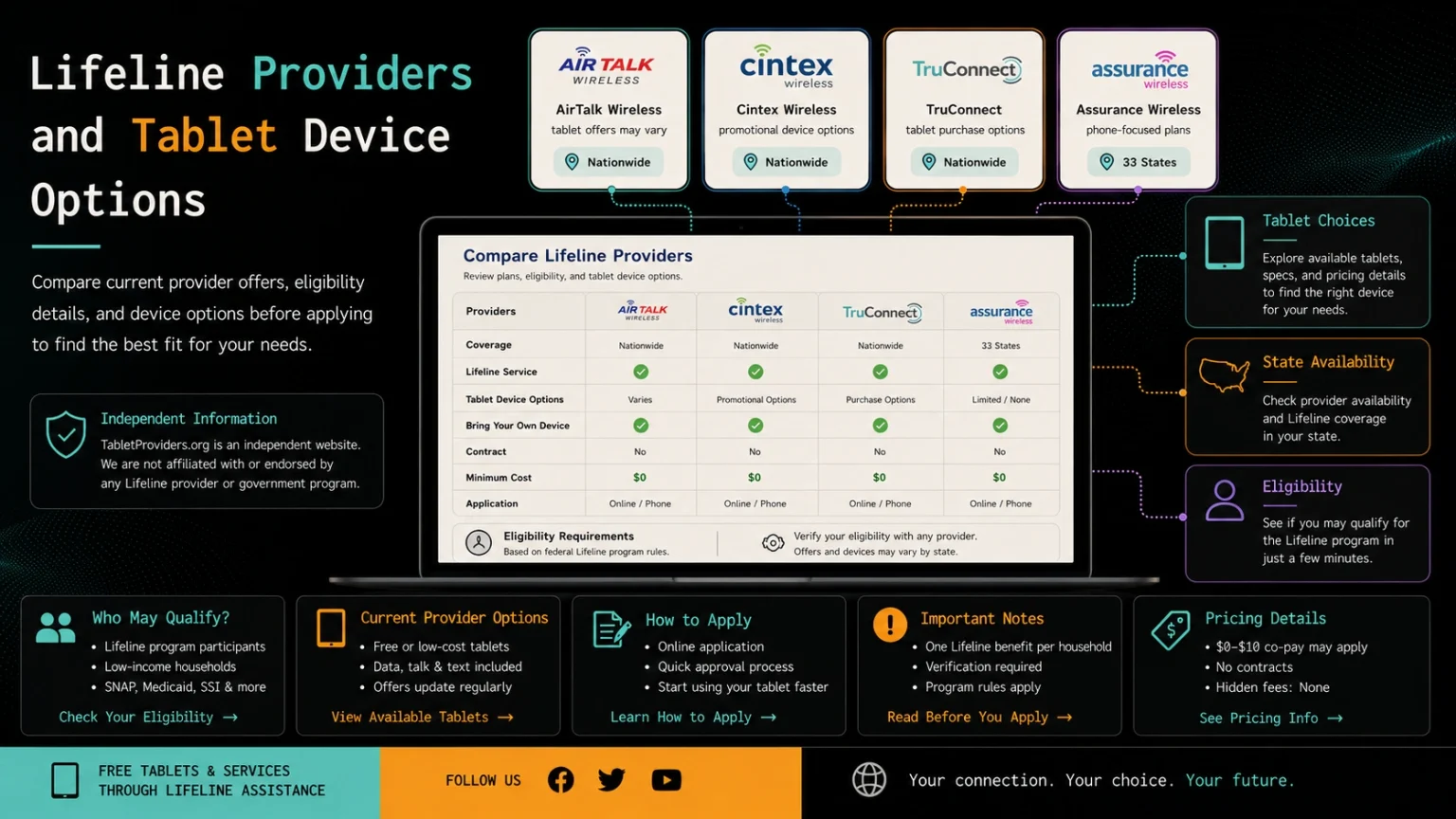
Lifeline Providers and Tablet Options
Several Lifeline companies offer free monthly phone service, while some also advertise separate tablet promotions or devices for purchase. Tablet pricing, models, stock, service requirements, and availability differ by provider and location. Compare the current terms carefully before applying through a provider’s official website.
Independent website notice: TabletFromGovernment.com does not represent, operate, or receive applications for any provider listed below. We do not supply tablets, determine eligibility, or guarantee approval, pricing, delivery, or device availability.
Compare Lifeline Providers and Device Offers
Lifeline is a federal benefit that helps eligible households reduce the cost of qualifying phone or internet service. A Free Government Tablet is not a standard benefit guaranteed by Lifeline. Any free, discounted, or purchasable device is offered separately by the participating company and may include additional conditions.
AirTalk Wireless
AirTalk Wireless actively advertises deeply discounted or free tablet options for qualifying Lifeline customers. Its current tablet catalog includes devices from brands such as Samsung, Apple, TCL, Alcatel, and ASUS, although listed prices and stock status vary between models.
AirTalk service and promotions are not available in every state or area. Applicants should enter their ZIP code, review the available tablet price, and check service, shipping, activation, replacement, and return terms before submitting an application.
What to check:
- Tablet price after approval
- Available brands and models
- State and ZIP-code coverage
- Monthly service included
- Shipping and activation costs
Cintex Wireless
Cintex Wireless currently promotes Lifeline phone service and displays tablet and iPad options on its website. Its product pages have included devices such as the KonnectONE Moxee Tablet and Samsung Galaxy tablet models, but the available selection can change.
Cintex explains that free or discounted devices are limited-time company promotions rather than tablet costs paid directly by the government. Offers may depend on eligibility, location, available inventory, and the terms shown during the application process.
What to check:
- Current tablet promotion
- Final device cost
- Included data service
- Model condition and storage
- Availability in your state
TruConnect
TruConnect provides qualifying Lifeline customers with free phone service and may offer an eligible customer a smartphone. Its official support center also allows existing customers to purchase a tablet through their TruConnect account.
TruConnect should not automatically be described as a free-tablet provider. Its official device pages have listed tablets for purchase, including the Sunshine T2 Elite at $120, so customers should confirm the current price rather than relying on older ACP-era advertisements.
What to check:
- Whether a tablet purchase is available
- Device price and payment method
- Account and plan requirements
- Delivery address and shipping
- Warranty and replacement rules
Assurance Wireless
Assurance Wireless offers qualifying households Lifeline service with talk, text, and mobile data on the T-Mobile network. Its current plans may also include a free basic smartphone or allow customers to bring a compatible phone.
The provider’s current official pages do not clearly advertise a standard tablet benefit. Assurance Wireless can still be included as a Lifeline service option, but it should not be presented as a confirmed tablet provider unless a current tablet offer appears for the visitor’s state or ZIP code.
What to check:
- State-specific Lifeline plan
- Free-phone availability
- Monthly data allowance
- Network coverage
- Whether any tablet option appears
Current Provider Overview
Based on the providers’ current official information:
- AirTalk Wireless: Advertises free or discounted tablet options
- Cintex Wireless: Displays promotional tablet and iPad options
- TruConnect: Allows eligible or existing customers to purchase tablets
- Assurance Wireless: Primarily offers phone service and smartphones
These categories can change because providers regularly update their inventory, state coverage, pricing, and promotions. Always verify the offer shown after entering your ZIP code.
Who May Qualify Through Lifeline?
A household may qualify for Lifeline when its gross income is at or below 135% of the Federal Poverty Guidelines or when a household member participates in an approved program, including:
- SNAP
- Medicaid
- Supplemental Security Income
- Federal Public Housing Assistance
- Veterans and Survivors Pension Benefit
- Certain Tribal assistance programs
Only one Lifeline benefit is permitted per household. Meeting these requirements may establish eligibility for discounted service, but it does not guarantee that a provider will offer a tablet.
How to Compare Providers Safely
Check Your Location
Enter your ZIP code on each provider’s official website. A company may serve your state but still have limited coverage or different offers within particular areas.
Review the Device Cost
Look for the final tablet price rather than relying only on words such as “free” or “government tablet.” Check for shipping, activation, service, upgrade, and replacement charges.
Examine the Tablet Details
Review the brand, model, storage, operating system, condition, network compatibility, and warranty. Applicants may not receive the model shown in advertisements if it becomes unavailable.
Understand the Service Plan
Confirm whether the tablet requires an active plan, how much monthly data is included, and what happens when the data allowance is used.
Read Provider Policies
Check cancellation, return, replacement, lost-device, and warranty rules before accepting a device or making a payment.
How to Apply Through a Provider
1. Confirm Lifeline Eligibility
Check whether you qualify through household income or participation in an approved benefit program.
2. Enter Your ZIP Code
Use the provider’s official website to confirm service and device availability where you live.
3. Compare the Available Offer
Review the tablet price, model, data plan, charges, stock status, and provider terms.
4. Prepare Your Documents
You may need proof of identity, address, household income, or participation in a qualifying benefit program when eligibility cannot be verified automatically.
5. Apply on the Official Website
Submit the application directly through the verified provider or Lifeline system. Do not send application documents through TabletFromGovernment.com.
6. Save Your Confirmation
Keep your application number, submitted documents, payment receipt, and provider contact information for future follow-up.
Important Provider Disclaimer
Provider names are included for comparison and informational purposes. Their appearance on this page does not indicate sponsorship, endorsement, affiliation, or partnership with TabletFromGovernment.com.
Tablet models, prices, inventory, service plans, state coverage, and eligibility requirements may change without notice. Approval for Lifeline does not automatically guarantee a tablet, and a provider may offer a smartphone or service plan instead.